United States Passport Photo: check yours against the official spec
A US passport photo must be 2 x 2 inches (51 x 51 mm), square, with a plain white or off-white background. Your head (chin to top of hair) must measure between 1 and 1 3/8 inches (25-35 mm), and your eyes must sit between 1 1/8 and 1 3/8 inches (28-35 mm) from the bottom of the photo. The digital file must be JPEG, at least 600 x 600 pixels.
Click anywhere here, or drag and drop your photo. Use a clear, front-facing photo against a plain white wall in even light. We measure and crop it. We never edit the pixels you submit.

United States passport photo requirements
| Photo size | 2 × 2 inches (51 × 51 mm) |
|---|---|
| Head height (chin to top of hair) | 1 to 1 3/8 in (25 to 35 mm) |
| Eye height from bottom | 1 1/8 to 1 3/8 in (28 to 35 mm) |
| Background | plain white or off-white |
| Digital file | JPEG, at least 600 × 600 px |
What acceptable and unacceptable photos look like, per the State Department
 Acceptable
The background is white or off-white, without shadows, and is plain without texture, objects, or lines.
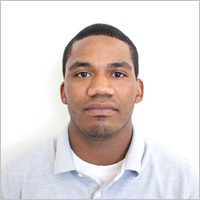 Acceptable
The head is centered and the correct size.
 Unacceptable
The customer's head size is too small in photo.
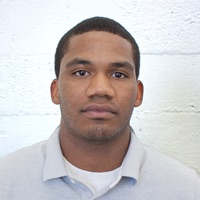 Unacceptable
The background is not plain and has texture and lines.
 Unacceptable
The background is blue.
 Unacceptable
The background is cropped using a photo retouching tool, changing the outline of the head, face, and neck.
Example photos: U.S. Department of State (public domain). Captions are the official descriptions from travel.state.gov.
Common reasons a United States passport photo is rejected
- Background is not plain white/off-white, or has a visible shadow or pattern.
- Head is too small or too large in the frame (outside the 25-35 mm range).
- Eyes are too high or too low in the frame.
- Glasses glare, closed eyes, non-neutral expression, or head tilted/turned.
- Photo has been digitally altered, filtered, or AI-edited. As of Jan 1, 2026 the US State Department rejects altered photos and treats deliberate manipulation as misrepresentation.
“Photos must not be changed using computer software, phone apps or filters, or artificial intelligence.”
U.S. Department of State, passport photo requirements
Photo rejections are common, and you pay twice
A rejected photo means a delayed application and paying again for a retake. It's one of the most common problems people hit when applying, and it's exactly what this tool is built to catch before you submit:
- r/Passports: the many reasons photos get rejected →
- r/travel: struggling to get a visa photo under the file-size limit →
- MoneySavingExpert: a rejected UK passport photo and the redo →
We measure your photo against the official spec, never AI-edit it (itself a rejection reason as of 2026), and back it accepted-or-your-money-back.
What your result screen shows
Every photo is measured against these checks, the same list you see after uploading:
- Head size
- Eye position
- Framing room
- Resolution
- Background colour
- Plain background
- Even lighting
- Pose & expression
When every required check passes, the verdict reads “Passed” and you can download the exact photo you uploaded, cropped to spec, never edited. If a check fails, you get the reason and how to retake, and you pay nothing.
What real users said
“Photo accepted at the post office on the first try, which honestly surprised me. The instant spec check feels like it should be the default everywhere.”
Derya“The webcam check instantly flagged my background was too cluttered even though I thought it looked fine, which was a nice surprise. Glad I didn't waste money printing a bad photo.”
Irmak“Took a quick selfie with my webcam and it actually flagged the right issues with my framing. Kind of cool that they don't just slap a filter on it.”
Zafer“love the pay-only-if-it-passes model, such a smart way to build trust before asking anyone to hand over money. the no AI editing promise is a really thoughtful touch too.”
Azra
From our Product Hunt launch, quoted verbatim. We never invent testimonials.
What a passport photo really costs
The photo is the cheap part. The expensive part is a rejection: redo fees, another queue, and a delayed application or trip. Here is the honest comparison:
| Pharmacy or retail (CVS, Walgreens)$16 to $17 per attempt | No compliance guarantee. A rejection means paying and queueing again. |
|---|---|
| USPS photo serviceabout $15 | Same deal: rejected means a second visit and a second fee. |
| Cheap online photo editors$1 to $3 | Most replace your background with software. Edited photos are a documented rejection reason for the US, UK and Canada since 2026, and refunds usually cover technical failures only. |
| Compliant Passport PhotoFree check. $9 only if it passes | We measure and crop your original, never edit it. Accepted or your money back. |
Retail prices are typical 2026 US prices and vary by location. Our guarantee: accepted or your money back.
Built by a real person
Nic built this after his own passport photo was rejected over a sizing issue he could not even see. The tool measures your photo against the official spec and never edits it, because since 2026 the US, UK and Canada reject AI-altered photos.
Read the launch storyFrequently asked questions
What size is a US passport photo?
2 x 2 inches (51 x 51 mm), square. The digital version must be at least 600 x 600 pixels, saved as a JPEG.
What background does a US passport photo need?
A plain white or off-white background with no shadows, patterns, or other people or objects.
How big should my head be in the photo?
Your head, measured from the bottom of your chin to the top of your hair, must be between 1 and 1 3/8 inches (25 to 35 mm).
Can I use an AI tool to edit or fix my passport photo?
No. As of 2026 the US Department of State rejects photos that have been digitally altered, filtered, or AI-edited, and treats deliberate manipulation as misrepresentation. This tool only measures, validates, and crops your original photo. It never alters the pixels you submit. If the background or lighting fails, retake the photo against a plain white wall in even light.
Can I wear glasses?
Glasses are generally not accepted for US passport photos except for documented medical reasons. If you must wear them, there must be no glare and your eyes must be clearly visible.
Can I take a US passport photo at home?
Yes. Take a front-facing photo against a plain white or off-white wall in even, shadow-free light, with your whole head and the top of your shoulders visible. This tool checks it against the official 2 x 2 inch spec, crops it exactly, and tells you precisely what to retake if anything is off.
Can I smile in a US passport photo?
A neutral expression or a natural smile is acceptable. Both eyes must be open and your mouth closed, and you must face the camera directly.
How recent does my US passport photo have to be?
It must be taken within the last 6 months and reflect your current appearance.
How many passport photos do I need?
You need one digital photo for an online renewal, or one printed photo stapled to a mail-in application
How much does a US passport photo cost?
In-store passport photos typically cost about $10-20 at a pharmacy, post office, or photo shop. This tool lets you check and crop your own photo, and you only pay when it passes the compliance check.
Common problems with this photo
Photo upload errors we can fix
- DS-160: “An error occurred while processing your photo” →
What the vague processing error actually means and the 2-minute file fix.
- DS-160: “Photo does not meet requirements” →
The exact checks the DS-160 uploader runs and how to pass each one.
- DS-160: “Photo upload service unavailable” →
Whether it is your file or their server, and what to do in each case.
- CEAC: “Invalid Image Detected” →
The official fix steps for the CEAC upload error, in plain English.
- Vietnam eVisa: “portrait photo captured from another source” →
Why the portal flags scanned or re-photographed portraits and the fix.
- NZ passport photo checker rejected your photo →
The most common reasons the NZ online checker fails a photo.
- Canada online passport renewal photo rules (2026) →
The digital photo rules now that online renewal is open to all adults.
- Paid for a store photo that got rejected? →
What Walgreens charges and how to check a photo free before paying again.
Other documents we check
- United States Visa photo
- United Kingdom Passport photo
- Canada Passport photo
- Schengen Area Visa photo
- India Passport photo
- Australia Passport photo
- India Visa photo
- United Kingdom Visa photo
- Ireland Passport photo
- New Zealand Passport photo
- United States Green Card photo
- China Visa photo
- Germany Passport photo
- France Passport photo
- Spain Passport photo
- Italy Passport photo
- Philippines Passport photo
- Japan Passport photo
- Brazil Passport photo
- India OCI Card photo
Common questions & guides
- Can you wear glasses in a US passport photo?
- US baby & infant passport photo requirements
- US passport photo with a head covering
- How much does a US passport photo cost, and where to get one
- How to take a passport photo at home
- Passport photo size in pixels, inches, mm and cm
- Where to get a passport photo near you
- CVS vs Walgreens vs USPS vs Costco passport photos
- The cheapest way to get a passport photo
- The best online passport photo tool: what to look for
- Why AI-edited passport photos now get rejected (2026 rule)
- Why was my passport photo rejected? The 6 most common reasons
- Passport photo rejected for being too bright or overexposed
- Passport photo rejected for shadows or the wrong background
- Passport photo rejected for head size: too small or too large
- DS-160 photo upload error: how to fix a rejected visa photo file
- DS-160 says your photo does not meet the requirements: how to fix it
- US passport photo tool rejected your photo: what each flag means
- DV Lottery photo checker: the spec that disqualifies entries
- AI passport photo apps compared (2026)
- PhotoAiD alternative: a tool that checks and crops, never edits
- Is it safe to use AI passport photo tools?
- DS-160 photo too large: fix the 240 KB file size limit
- DS-160 photo wrong dimensions: how to make it square
- DS-160 photo background not white: how to fix it
- Can you smile in a passport photo?
- Can you wear earrings or jewelry in a passport photo?
- Can you wear makeup in a passport photo?
- Do you have to shave for a passport photo?
- What should you wear for a passport photo?
- Can you wear hearing aids in a passport photo?
- Do your ears need to show in a passport photo?
- Can you wear AirPods or headphones in a passport photo?
- How recent does a passport photo have to be?
- Can you reuse an old passport photo?
- Passport photo vs visa photo: what's the difference?
- How to print a passport photo at home or for pennies
- Digital passport photo for online renewal: the requirements
- How to get a white background for a passport photo without editing
- New US visa interview rule (July 2026): interview in your home country, and get your DS-160 photo right first
- DV lottery photo requirements: the full 2026 checklist
- DV lottery disqualified for the photo? What actually fails entries
- DV lottery photos for your spouse, kids and baby
- DV lottery photo guide for applicants from Uzbekistan
- DV lottery photo guide for applicants from Moldova
- DV lottery photo guide for applicants from Nepal
- US visa photo requirements for applicants from India
- US visa photo requirements for applicants from Nigeria
- US visa photo requirements for applicants from the Philippines
- Convert any photo to 2x2 inches (600x600) free
- DS-160 photo rejected: every reason and its fix
- CEAC 'Invalid Image Detected' error: how to actually get your upload through
- US online passport renewal photo: the 54 KB rule and upload spec
- DV lottery photo guide for applicants from Egypt
- DV lottery photo guide for applicants from Albania
- DV lottery photo guide for applicants from Ethiopia
- DV lottery photo guide for applicants from Morocco
- DV-2028 lottery: registration status and the photo to prepare now
- Does ESTA need a photo? Yes, a selfie, and here is how it fails
- DS-160: 'An error occurred while processing your photo' and how to get past it
- DS-160 photo upload service unavailable: what it means and what to do
- DV lottery photo guide for applicants from Kenya
- DV lottery photo guide for applicants from Ukraine
- US visa photo requirements for applicants from Mexico
- US visa photo requirements for applicants from Brazil
- K-1 fiance visa photo requirements
- H-1B visa photo requirements
- F-1 student visa photo requirements
- Can you wear a wig or hairpiece in a passport photo?
- DS-160: "Se produjo un error al procesar su foto" y cómo superarlo
- DS-160 dice que la foto no cumple con los requisitos: cómo arreglarla
- CEAC "Invalid Image Detected" (imagen no válida): la solución oficial
- Requisitos de la foto para la visa americana: medidas y formato
- Foto para pasaporte americano: medidas 2x2 y requisitos completos
- Lotería de visas DV-2028: fechas de registro y la foto que hay que preparar ya
- Error al subir la foto al DS-160: cómo arreglar el archivo rechazado
- How much are passport photos at Walgreens?
- Costco passport photo price: why there isn't one anymore
- How much is a passport photo at the post office?
- Rite Aid passport photo price: the stores are gone
- Passport photo rules: glasses, hats, and what to wear
- US visa photo requirements for applicants from Vietnam
- Passport photos for elderly or wheelchair users (seated is fine)
- Scars, birthmarks, and moles in a passport photo
- Do you need a new passport photo after your appearance changes?
- DS-160 : « Une erreur s'est produite lors du traitement de votre photo », que faire
- Photo pour le visa américain : exigences, dimensions et format
- Photo pour le passeport américain : format 2 x 2 pouces et règles complètes
- CEAC « Invalid Image Detected » (image non valide) : la solution officielle
- DS-160: "Ocorreu um erro ao processar sua foto" e como resolver
- Foto para visto americano: requisitos, tamanho e formato
- Foto para passaporte americano: medidas 2x2 (5x5 cm) e requisitos completos
- Foto para a loteria de vistos (green card): requisitos completos
- Passport Photo Online alternative: check and crop, never edit
- Smartphone iD alternative: a tool that checks, never edits
- IDPhoto4You alternative: a free crop is not a compliance check
- ePassportPhoto alternative: check and crop, never adapt the background
- Why AI-edited passport photos get rejected in 2026
- Loterie de visas DV-2028 : exigences de photo à préparer dès maintenant
- Loteria de vistos DV-2028: datas e a foto que já deve preparar
- US passport expiring in 2027? When to renew before the rush
- The 6-month passport validity rule: which countries enforce it
- Global Entry photo requirements: same spec as a US passport photo
- How much are passport photos at Walmart?
- Passport photo tips for a crying or squirming baby
- Religious head coverings in passport photos: which countries allow them
- ¿Descalificado en la lotería de visas por la foto? Lo que realmente falla
- Fotos para la lotería de visas: cónyuge, hijos y bebé
- Cómo tomarte una foto de pasaporte en casa
- ¿Puedo sonreír en la foto del pasaporte?
- Green card photo requirements: the I-485 photo spec, and the Dec 2025 change
- FedEx Office passport photo cost: what you'll actually pay
- UPS Store passport photo cost: prices vary by location
- B-1/B-2 visitor visa photo requirements
- US visa photo requirements for applicants from China
- US visa photo requirements for applicants from Pakistan
- ¿Por qué rechazaron mi foto de pasaporte? Las 6 razones más comunes
- Foto de pasaporte para bebés y recién nacidos (EE.UU.)
- ¿Puedo usar lentes en la foto del pasaporte?
- ¿Cuánto cuesta una foto de pasaporte en Estados Unidos?
- What happens if your DS-160 photo is rejected after you submit?
- Does your DS-160 photo need to match your interview photo?
- Can a DS-160 photo be black and white?
- Passport photo rejected for being too dark or underexposed
- Can you use a photo booth picture for the DS-160?
- How many passport photos do you need for a US application?
- How much does AAA charge for passport photos?
- DV lottery photo guide for applicants from Algeria
- DV lottery photo guide for applicants from Turkey
- DV lottery photo guide for applicants from Russia
- US visa photo requirements for applicants from Colombia
- CEAC photo requirements for the DS-260 immigrant visa
- NVC document upload failed in CEAC: the file rules that fix it
- CEAC file size limits: 2 MB per document, 240 KB per photo
- CEAC 'The requested URL was rejected' error: the official 4-step fix
- DS-260 photo upload not working? Where the photo actually goes
- How much are passport photos at Staples?
- Your US passport photo was rejected after you mailed it
- ¿Cuántas fotos necesitas para el pasaporte americano?
- ¿Puede la foto del DS-160 ser en blanco y negro?
- ¿La foto del DS-160 debe coincidir con la de la entrevista?
- DV lottery photo guide for applicants from Ghana
- DV lottery photo guide for applicants from Cameroon
- DS-11 photo requirements (first-time US passport)
- DS-82 photo requirements (US passport renewal by mail)